OAuth 2.0 Authentication Guide
CAFE24 API provides an OAuth 2.0-based secure authentication system. This guide explains step-by-step authentication methods and token management in detail.
📚 Table of Contents
- OAuth 2.0 Overview
- Authentication Flow
- Step 1: Request Authorization Code
- Step 2: Issue Access Token
- Step 3: API Call
- Token Refresh
- Token Revoke
- Authentication Methods by API
- Security Best Practices
- Error Handling and Troubleshooting
- Production Checklist
🔑 OAuth 2.0 Overview
OAuth 2.0 is an open standard that allows third-party applications to securely access APIs without directly sharing user credentials.
Key Features
- Security: Does not expose user passwords
- Permission Control: Fine-grained permission management via Scope
- Token-based: Uses temporary Access Token
- Refreshable: Automatic refresh via Refresh Token
Core Terms
| Term | Description |
|---|---|
| Resource Owner | Shopping mall administrator (end user) |
| Client | Application registered in CAFE24 App Store |
| Authorization Server | CAFE24 OAuth server |
| Resource Server | CAFE24 API server |
| Access Token | Temporary token representing API access permission |
| Refresh Token | Token for refreshing Access Token |
| Scope | Permission range held by the token |
| Authorization Code | Temporary authorization code (valid for 1 minute) |
🔄 Authentication Flow
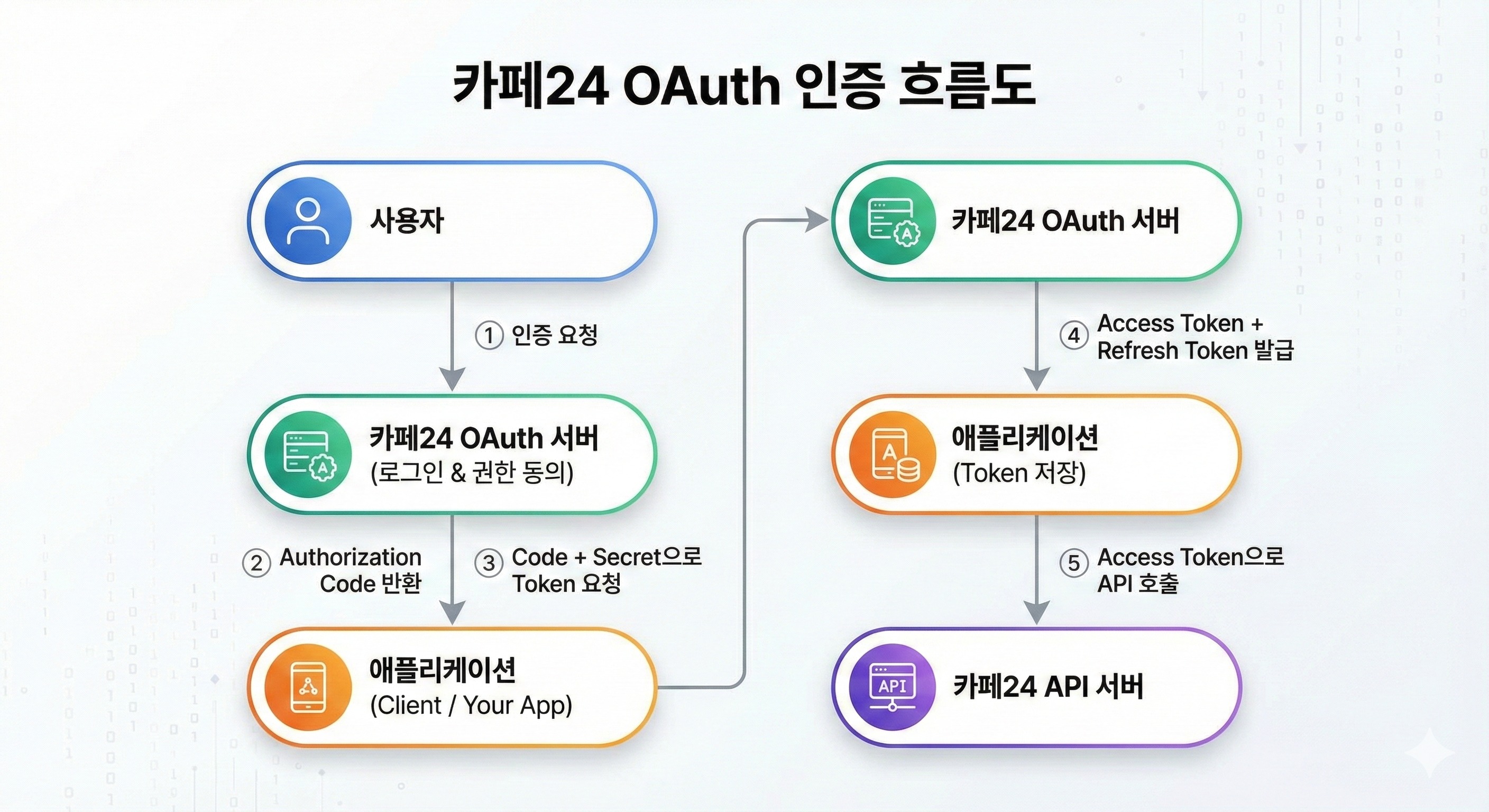
🎯 Step 1: Request Authorization Code
Overview
When a user approves an application, you receive an Authorization Code. This code is required to issue an Access Token.
⚠️ Important: Code requests should ONLY be made in a web browser. Do not request directly using cURL or programming languages.
Required Parameters
| Parameter | Description | Example |
|---|---|---|
mall_id | Shopping mall ID | yourmall |
response_type | Response type (fixed) | code |
client_id | App's Client ID | BrIfqEKoPxeE..... |
redirect_uri | Redirect URL after authentication | https://yourapp.com/callback |
scope | Permission scope to request (space-separated) | mall.read_product mall.read_order |
state | CSRF prevention token (required) | random_string_12345 |
Request URL
https://{mall_id}.cafe24api.com/api/v2/oauth/authorize?response_type=code&client_id={client_id}&state={state}&redirect_uri={redirect_uri}&scope={scope}
Actual Usage Example
# Enter in web browser address bar or provide as a link
https://yourmall.cafe24api.com/api/v2/oauth/authorize?response_type=code&client_id=BrIfqEKoPxeE&state=xyz789&redirect_uri=https%3A%2F%2Fyourapp.com%2Fcallback&scope=mall.read_product+mall.read_order+mall.read_store
Success Response
When the user approves permissions, CAFE24 server redirects to the configured redirect_uri:
HTTP/1.1 302 Found
Location: https://yourapp.com/callback?code={authorization_code}&state=xyz789
Response Parameters
| Parameter | Description |
|---|---|
code | Authorization Code (valid for 1 minute, single use) |
state | State value sent with request (for CSRF verification) |
Implementation Examples
Node.js/Express
const express = require('express');
const crypto = require('crypto');
const app = express();

const CLIENT_ID = process.env.CAFE24_CLIENT_ID;
const CLIENT_SECRET = process.env.CAFE24_CLIENT_SECRET;
const MALL_ID = process.env.CAFE24_MALL_ID;
const REDIRECT_URI = process.env.CAFE24_REDIRECT_URI;

// When login button is clicked
app.get('/login', (req, res) => {
  // Generate State value (CSRF prevention)
  const state = crypto.randomBytes(16).toString('hex');

  // Save to session
  req.session.oauthState = state;

  // Define Scope
  const scopes = ['mall.read_product', 'mall.read_order', 'mall.read_store'].join(' ');

  // Create CAFE24 OAuth URL
  const authUrl = new URL(`https://${MALL_ID}.cafe24api.com/api/v2/oauth/authorize`);
  authUrl.searchParams.append('response_type', 'code');
  authUrl.searchParams.append('client_id', CLIENT_ID);
  authUrl.searchParams.append('state', state);
  authUrl.searchParams.append('redirect_uri', REDIRECT_URI);
  authUrl.searchParams.append('scope', scopes);

  // Redirect user to OAuth page
  res.redirect(authUrl.toString());
});
Python/Flask
from flask import Flask, session, redirect, url_for, request
from urllib.parse import urlencode
import secrets

app = Flask(__name__)

CLIENT_ID = os.getenv('CAFE24_CLIENT_ID')
CLIENT_SECRET = os.getenv('CAFE24_CLIENT_SECRET')
MALL_ID = os.getenv('CAFE24_MALL_ID')
REDIRECT_URI = os.getenv('CAFE24_REDIRECT_URI')

@app.route('/login')
def login():
    # Generate State value
    state = secrets.token_urlsafe(32)
    session['oauth_state'] = state
    session.modified = True

    # Define Scope
    scopes = ['mall.read_product', 'mall.read_order', 'mall.read_store']

    # Configure parameters
    params = {
        'response_type': 'code',
        'client_id': CLIENT_ID,
        'state': state,
        'redirect_uri': REDIRECT_URI,
        'scope': ' '.join(scopes)
    }

    # Create OAuth URL
    auth_url = f"https://{MALL_ID}.cafe24api.com/api/v2/oauth/authorize?{urlencode(params)}"

    return redirect(auth_url)
🎯 Step 2: Issue Access Token
Overview
Use the Authorization Code to receive an Access Token required for actual API calls. This request must be made securely from the backend server.
Required Parameters
| Parameter | Description | Example |
|---|---|---|
grant_type | Request type (fixed) | authorization_code |
code | Authorization Code received from Step 1 | abc123... |
redirect_uri | Same Redirect URL used in Step 1 | https://yourapp.com/callback |
Authorization Header
Authorization: Basic {base64_encode({client_id}:{client_secret})}
Request
curl -X POST \\
  'https://{mall_id}.cafe24api.com/api/v2/oauth/token' \\
  -H 'Authorization: Basic {base64_encode({client_id}:{client_secret})}' \\
  -H 'Content-Type: application/x-www-form-urlencoded' \\
  -d 'grant_type=authorization_code&code={code}&redirect_uri={redirect_uri}'
Base64 Encoding Generation
# macOS/Linux
echo -n "BrIfqEKoPxeE:xYz789" | base64
# Result: QnJJZnFFSm9QeGVFOnh5Wig0OQ==
Success Response (200 OK)
{
  "access_token": "0iqR5nM5EJIq..........",
  "expires_at": "2021-03-01T14:00:00.000",
  "refresh_token": "JeTJ7XpnFC0P..........",
  "refresh_token_expires_at": "2021-03-15T12:00:00.000",
  "client_id": "BrIfqEKoPxeE..........",
  "mall_id": "yourmall",
  "user_id": "test",
  "scopes": [
    "mall.read_order",
    "mall.read_product",
    "mall.read_store"
  ],
  "issued_at": "2021-03-01T12:00:00.000",
  "shop_no": "1",
  "token_type": "Bearer"
}
Response Field Description
| Field | Description | Validity Period |
|---|---|---|
access_token | Token for API calls | 2 hours |
refresh_token | Token for refreshing tokens | 2 weeks |
expires_at | Access Token expiration time | - |
refresh_token_expires_at | Refresh Token expiration time | - |
token_type | Token type (always Bearer) | - |
scopes | List of approved permissions | - |
issued_at | Token issuance time | - |
Implementation Examples
Node.js/Express
const axios = require('axios');
const Base64 = require('js-base64').Base64;

app.get('/callback', async (req, res) => {
  const { code, state } = req.query;

  // Validate State
  if (state !== req.session.oauthState) {
    return res.status(401).json({ error: 'Invalid state' });
  }

  try {
    // Base64 encoding
    const auth = Base64.encode(`${CLIENT_ID}:${CLIENT_SECRET}`);

    // Token request
    const response = await axios.post(
      `https://${MALL_ID}.cafe24api.com/api/v2/oauth/token`,
      `grant_type=authorization_code&code=${code}&redirect_uri=${REDIRECT_URI}`,
      {
        headers: {
          'Authorization': `Basic ${auth}`,
          'Content-Type': 'application/x-www-form-urlencoded'
        }
      }
    );

    const tokenData = response.data;

    // Save tokens to DB or session
    req.session.tokens = {
      access_token: tokenData.access_token,
      refresh_token: tokenData.refresh_token,
      expires_at: new Date(tokenData.expires_at),
      refresh_token_expires_at: new Date(tokenData.refresh_token_expires_at)
    };

    // Save user information
    req.session.user = {
      mall_id: tokenData.mall_id,
      user_id: tokenData.user_id,
      shop_no: tokenData.shop_no,
      scopes: tokenData.scopes
    };

    res.redirect('/dashboard');
  } catch (error) {
    console.error('Token exchange error:', error.response?.data);
    res.status(400).json({ error: 'Failed to get access token' });
  }
});
Python/Flask
import requests
import base64
from datetime import datetime

@app.route('/callback')
def callback():
    code = request.args.get('code')
    state = request.args.get('state')

    # Validate State
    if state != session.get('oauth_state'):
        return jsonify({'error': 'Invalid state'}), 401

    try:
        # Base64 encoding
        auth_string = f"{CLIENT_ID}:{CLIENT_SECRET}"
        auth_bytes = auth_string.encode('utf-8')
        auth_b64 = base64.b64encode(auth_bytes).decode('utf-8')

        # Token request
        response = requests.post(
            f"https://{MALL_ID}.cafe24api.com/api/v2/oauth/token",
            data={
                'grant_type': 'authorization_code',
                'code': code,
                'redirect_uri': REDIRECT_URI
            },
            headers={
                'Authorization': f'Basic {auth_b64}',
                'Content-Type': 'application/x-www-form-urlencoded'
            }
        )

        token_data = response.json()

        # Save tokens
        session['tokens'] = {
            'access_token': token_data['access_token'],
            'refresh_token': token_data['refresh_token'],
            'expires_at': token_data['expires_at'],
            'refresh_token_expires_at': token_data['refresh_token_expires_at']
        }

        session['user'] = {
            'mall_id': token_data['mall_id'],
            'user_id': token_data['user_id'],
            'shop_no': token_data['shop_no'],
            'scopes': token_data['scopes']
        }

        session.modified = True

        return redirect('/dashboard')
    except Exception as e:
        print(f"Token exchange error: {e}")
        return jsonify({'error': 'Failed to get access token'}), 400
🎯 Step 3: API Call
Overview
Use the issued Access Token to call CAFE24 APIs.
Authorization Header
Include the Access Token in Bearer token format in all API requests:
Authorization: Bearer {access_token}
Request Examples
Retrieve Products
curl -X GET \\
  'https://yourmall.cafe24api.com/api/v2/admin/products' \\
  -H 'Authorization: Bearer 0iqR5nM5EJIq..........' \\
  -H 'Content-Type: application/json'
Create Order
curl -X POST \\
  'https://yourmall.cafe24api.com/api/v2/admin/orders' \\
  -H 'Authorization: Bearer 0iqR5nM5EJIq..........' \\
  -H 'Content-Type: application/json' \\
  -d '{
    "customer_name": "John Doe",
    "customer_email": "john@example.com",
    "items": [
      {
        "product_no": 128,
        "quantity": 2
      }
    ]
  }'
Implementation Examples
Node.js/Express
async function makeApiRequest(endpoint, method = 'GET', data = null) {
  const { access_token } = req.session.tokens;

  const config = {
    method,
    url: `https://${MALL_ID}.cafe24api.com/api/v2/admin${endpoint}`,
    headers: {
      'Authorization': `Bearer ${access_token}`,
      'Content-Type': 'application/json'
    }
  };

  if (data) {
    config.data = data;
  }

  try {
    const response = await axios(config);
    return response.data;
  } catch (error) {
    if (error.response?.status === 401) {
      // Token expired, refresh required
      throw new Error('Token expired');
    }
    throw error;
  }
}

// Usage example
app.get('/api/products', async (req, res) => {
  try {
    const products = await makeApiRequest('/products');
    res.json(products);
  } catch (error) {
    res.status(500).json({ error: error.message });
  }
});
🔄 Token Refresh
Overview
Access Token expires after 2 hours. You can use the Refresh Token to issue a new Access Token.
Important Notes
- Refresh Token validity period: 2 weeks
- Automatic refresh: Requesting before Refresh Token expiration returns a new Refresh Token as well
- Previous token revocation: Previous Refresh Token is automatically revoked when a new token is issued
Request
curl -X POST \\
  'https://{mall_id}.cafe24api.com/api/v2/oauth/token' \\
  -H 'Authorization: Basic {base64_encode({client_id}:{client_secret})}' \\
  -H 'Content-Type: application/x-www-form-urlencoded' \\
  -d 'grant_type=refresh_token&refresh_token={refresh_token}'
Success Response (200 OK)
{
  "access_token": "21EZes0dGSfN..........",
  "expires_at": "2021-03-01T15:50:00.000",
  "refresh_token": "xLlhWztQHBik............",
  "refresh_token_expires_at": "2021-03-15T13:50:00.000",
  "client_id": "BrIfqEKoPxeE..........",
  "mall_id": "yourmall",
  "user_id": "test",
  "scopes": ["mall.read_order", "mall.read_product", "mall.read_store"],
  "issued_at": "2021-03-01T13:50:00.000",
  "shop_no": "1",
  "token_type": "Bearer"
}
Implementation Example - Auto Refresh Logic
Node.js/Express - Middleware
const Base64 = require('js-base64').Base64;

// Token refresh function
async function refreshAccessToken(refreshToken) {
  try {
    const auth = Base64.encode(`${CLIENT_ID}:${CLIENT_SECRET}`);

    const response = await axios.post(
      `https://${MALL_ID}.cafe24api.com/api/v2/oauth/token`,
      `grant_type=refresh_token&refresh_token=${refreshToken}`,
      {
        headers: {
          'Authorization': `Basic ${auth}`,
          'Content-Type': 'application/x-www-form-urlencoded'
        }
      }
    );

    return response.data;
  } catch (error) {
    console.error('Token refresh error:', error.response?.data);
    throw error;
  }
}

// Middleware - Auto token refresh
app.use(async (req, res, next) => {
  // Skip if no tokens
  if (!req.session.tokens) {
    return next();
  }

  const { access_token, refresh_token, expires_at } = req.session.tokens;
  const now = new Date();
  const expiresDate = new Date(expires_at);

  // Refresh 5 minutes before token expiration
  const refreshThreshold = new Date(expiresDate.getTime() - 5 * 60 * 1000);

  if (now > refreshThreshold) {
    try {
      const newTokens = await refreshAccessToken(refresh_token);
      req.session.tokens = {
        access_token: newTokens.access_token,
        refresh_token: newTokens.refresh_token,
        expires_at: new Date(newTokens.expires_at),
        refresh_token_expires_at: new Date(newTokens.refresh_token_expires_at)
      };
      console.log('Token refreshed successfully');
    } catch (error) {
      console.error('Token refresh failed, logging out user');
      req.session.destroy();
      return res.redirect('/login');
    }
  }

  next();
});
Python/Flask
def refresh_access_token(refresh_token):
    """Issue new Access Token with Refresh Token"""
    try:
        auth_string = f"{CLIENT_ID}:{CLIENT_SECRET}"
        auth_bytes = auth_string.encode('utf-8')
        auth_b64 = base64.b64encode(auth_bytes).decode('utf-8')

        response = requests.post(
            f"https://{MALL_ID}.cafe24api.com/api/v2/oauth/token",
            data={
                'grant_type': 'refresh_token',
                'refresh_token': refresh_token
            },
            headers={
                'Authorization': f'Basic {auth_b64}',
                'Content-Type': 'application/x-www-form-urlencoded'
            }
        )

        return response.json()
    except Exception as e:
        print(f"Token refresh error: {e}")
        raise

# Flask before_request - Auto token refresh
@app.before_request
def check_and_refresh_token():
    if 'tokens' not in session:
        return

    try:
        expires_at = datetime.fromisoformat(session['tokens']['expires_at'].replace('Z', '+00:00'))
        refresh_threshold = expires_at - timedelta(minutes=5)

        if datetime.now(timezone.utc) > refresh_threshold or datetime.now() > expires_at.replace(tzinfo=None):
            new_tokens = refresh_access_token(session['tokens']['refresh_token'])
            session['tokens'] = {
                'access_token': new_tokens['access_token'],
                'refresh_token': new_tokens['refresh_token'],
                'expires_at': new_tokens['expires_at'],
                'refresh_token_expires_at': new_tokens['refresh_token_expires_at']
            }
            session.modified = True
            print('Token refreshed successfully')
    except Exception as e:
        print(f'Token refresh failed: {e}')
        session.clear()
        return redirect('/login')
🛑 Token Revoke
Overview
You can explicitly revoke tokens when a user logs out or API access is no longer needed.
Important Notes
- Revoking an Access Token also revokes the associated Refresh Token
- API calls with revoked tokens result in 401 Unauthorized error
Request
curl -X POST \\
  'https://{mall_id}.cafe24api.com/api/v2/oauth/revoke' \\
  -H 'Authorization: Basic {base64_encode({client_id}:{client_secret})}' \\
  -H 'Content-Type: application/x-www-form-urlencoded' \\
  -d 'token={token}&token_hint={token_hint}'
Parameters
| Parameter | Description | Example |
|---|---|---|
token | Token to revoke (Access or Refresh) | 0iqR5nM5EJIq.. |
token_hint | Token type | access_token or refresh_token |
Implementation Examples
Node.js/Express
async function revokeToken(token, tokenHint = 'access_token') {
  try {
    const auth = Base64.encode(`${CLIENT_ID}:${CLIENT_SECRET}`);

    await axios.post(
      `https://${MALL_ID}.cafe24api.com/api/v2/oauth/revoke`,
      `token=${token}&token_hint=${tokenHint}`,
      {
        headers: {
          'Authorization': `Basic ${auth}`,
          'Content-Type': 'application/x-www-form-urlencoded'
        }
      }
    );

    console.log(`${tokenHint} revoked successfully`);
  } catch (error) {
    console.error('Token revoke error:', error.response?.data);
    throw error;
  }
}

// Logout endpoint
app.get('/logout', async (req, res) => {
  try {
    if (req.session.tokens) {
      // Revoke Access Token
      await revokeToken(req.session.tokens.access_token, 'access_token');
    }

    req.session.destroy();
    res.redirect('/login');
  } catch (error) {
    console.error('Logout error:', error);
    // Remove session even if token revocation fails
    req.session.destroy();
    res.redirect('/login');
  }
});
📡 Authentication Methods by API
Admin API (OAuth 2.0)
Authentication Method: Bearer Token
curl -X GET \\
  'https://yourmall.cafe24api.com/api/v2/admin/products' \\
  -H 'Authorization: Bearer {access_token}' \\
  -H 'Content-Type: application/json'
Requirements:
- OAuth 2.0 authentication required
- Access Token required
Front API (Client ID-based)
Authentication Method: Client ID Header
curl -X GET \\
  'https://yourmall.cafe24api.com/api/v2/products' \\
  -H 'X-Cafe24-Client-Id: {client_id}' \\
  -H 'Content-Type: application/json'
Requirements:
- OAuth 2.0 authentication not required
- Only Client ID required
Cafe24 Analytics API (OAuth 2.0)
Authentication Method: Bearer Token
curl -X GET \\
  'https://ca-api.cafe24data.com/visitors/pageview' \\
  -H 'Authorization: Bearer {access_token}' \\
  -H 'Content-Type: application/json'
🛡️ Security Best Practices
1. Protect Client Secret
// ✅ Use environment variables
const CLIENT_SECRET = process.env.CAFE24_CLIENT_SECRET;

// .env file
CAFE24_CLIENT_ID=BrIfqEKoPxeE
CAFE24_CLIENT_SECRET=xYz789

// Add to .gitignore
echo ".env" >> .gitignore
2. HTTPS Required
// ✅ Always use HTTPS
const redirectUri = 'https://yourapp.com/callback';
3. Prevent CSRF with State Value
const crypto = require('crypto');
const state = crypto.randomBytes(32).toString('hex');
session.oauthState = state;

// Verify in callback
if (req.query.state !== session.oauthState) {
  throw new Error('CSRF attack detected');
}
4. Token Storage Methods
Server Session (Recommended)
// Store tokens only in server session
req.session.tokens = {
  access_token: token.access_token,
  refresh_token: token.refresh_token,
  expires_at: token.expires_at
};
Database Storage (Encrypted)
CREATE TABLE user_tokens (
  id INT PRIMARY KEY,
  user_id VARCHAR(255),
  access_token VARCHAR(255) ENCRYPTED,
  refresh_token VARCHAR(255) ENCRYPTED,
  expires_at DATETIME,
  created_at TIMESTAMP DEFAULT CURRENT_TIMESTAMP
);
5. Handle Token Expiration
// Check token expiration time
const isTokenExpired = (expiresAt) => {
  return new Date() > new Date(expiresAt);
};
6. Verify Permissions (Check Scope)
const requiredScopes = ['mall.read_product', 'mall.write_order'];
const grantedScopes = tokens.scopes;

const hasAllScopes = requiredScopes.every(scope =>
  grantedScopes.includes(scope)
);

if (!hasAllScopes) {
  throw new Error('Insufficient permissions');
}
🐛 Error Handling and Troubleshooting
401 Unauthorized
Symptoms: "error": "invalid_grant" or "error": "invalid_token"
Causes:
- Authorization Code expired (must be used within 1 minute)
- Attempt to reuse Authorization Code
- Incorrect Client ID/Secret
- Token expired
Solutions:
// Attempt token refresh
if (error.response?.status === 401) {
  try {
    const newTokens = await refreshAccessToken(refresh_token);
    // Retry with new token
  } catch (refreshError) {
    // Refresh failed, re-login required
    res.redirect('/login');
  }
}
400 Bad Request
Symptoms: "error": "invalid_request"
Causes:
- Missing required parameters
- Incorrect redirect_uri
- Content-Type error
Solutions:
// Verify all required parameters
const requiredParams = ['grant_type', 'code', 'redirect_uri'];
const hasAllParams = requiredParams.every(param => data[param]);

if (!hasAllParams) {
  throw new Error('Missing required parameters');
}
403 Forbidden
Symptoms: Insufficient Scope permissions
Causes:
- Requested Scope was not approved
- User denied specific permissions during consent
Solutions:
// Check requested Scope
const requiredScopes = ['mall.read_product', 'mall.write_order'];
const missingScopes = requiredScopes.filter(
  scope => !tokens.scopes.includes(scope)
);

if (missingScopes.length > 0) {
  console.log(`Missing scopes: ${missingScopes.join(', ')}`);
  // Re-authentication required
  res.redirect('/login');
}
✅ Production Checklist
Development Phase
- OAuth flow tested in local development environment
- Redirect URI tested with localhost
- State value validation implemented
- Token storage mechanism implemented
- Error handling logic implemented
Security Review
- Client Secret stored only in environment variables
- .env file included in .gitignore
- HTTPS applied
- Tokens stored only in server session
- CSRF token (State) validation implemented
- Token expiration handling implemented
API Testing
- Authorization Code issuance tested
- Access Token issuance tested
- API call tested (all Scopes)
- Token refresh tested
- Token revoke tested
- Scope permission validation tested
Pre-Deployment
- Redirect URI changed to production URL
- Redirect URI registration verified in Developer Center
- Environment variable configuration verified
- HTTPS certificate verified
- Error logging configured
- Token refresh logic tested
Monitoring
- Token expiration issues monitored
- API call failures logged
- Unauthorized errors tracked
- Token refresh success/failure rate monitored
📚 Additional Resources
🤝 Support
If you encounter issues:
- Check the Troubleshooting section of this guide
- API Documentation